
2.1 Homelink Network Overview
Network Overview
Network Topology:
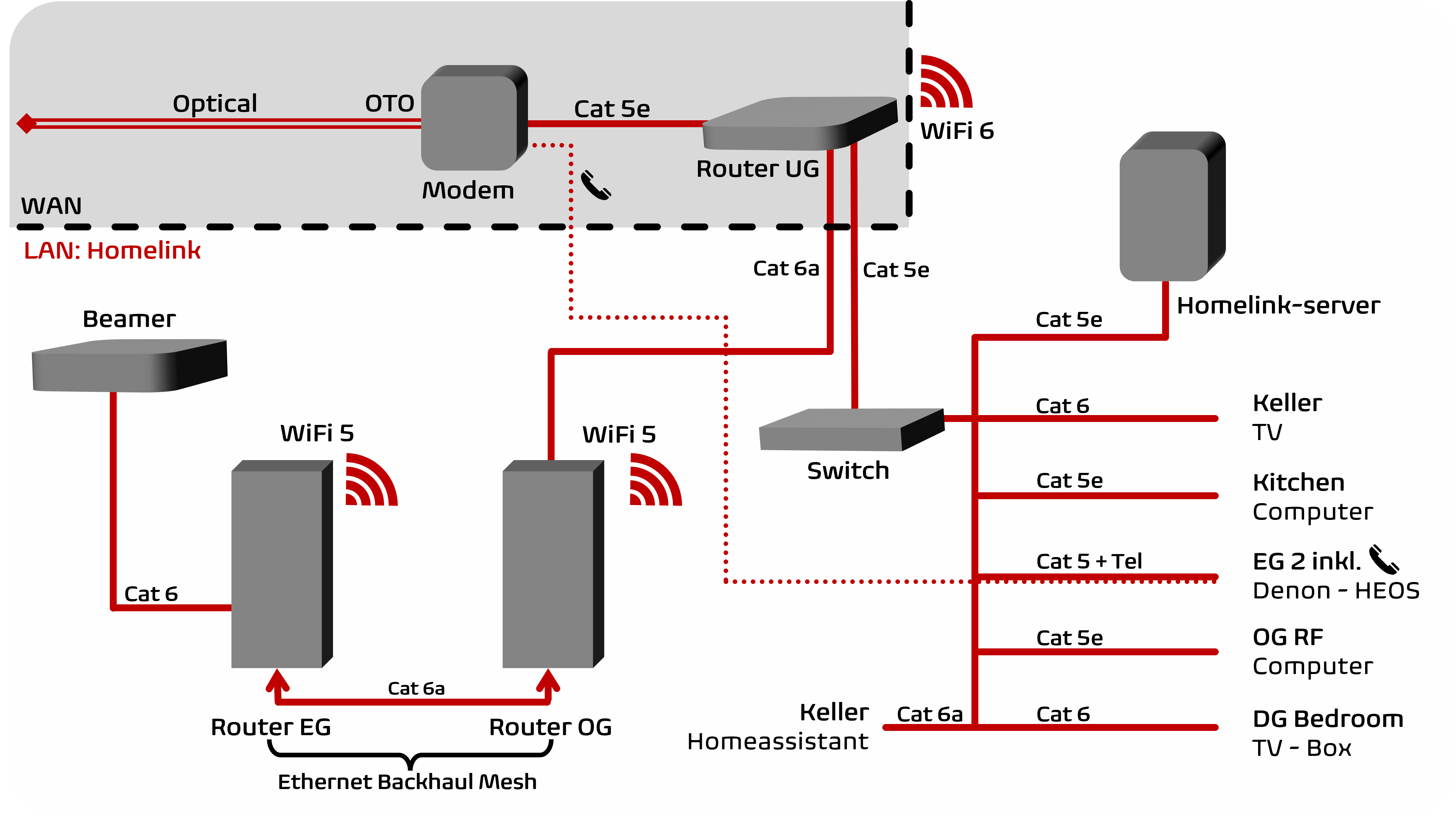
For description of technical terminology see technical terms
Detailed Description
Subscription & Modem
Das Abo von Quickline liefert 500mbit/s (62MB/s) Internet über das Glasfaserkabel. Das Modem wandelt die Lichtsignale in elektrische Signale um, welche über ein Ethernetkabel zum Hauptrouter (Calix von Quickline, siehe Zugangsdaten). Zusätzlich wandelt das Modem auch das Signal für das Festnetztelefon um. Modem und Hauptrouter befinden sich im Keller.
Quickline's subscription delivers internet via the fibre optic cable. The modem converts the optical light signals into electrical signals, which are sent via an Ethernet cable to the main router (manufactured by Calix, see login data). In addition, the modem also converts the signal for the landline telephone. The modem and the main router are in the basement.
Router, Homelink, WAN vs. LAN
Der Hauptrouter trennt das öffentliche, externe Netzwerk von Quickline (WAN) und erzeugt ein neues, privates Netzwerk (LAN) für zuhause namens Homelink. In diesem Netzwerk können alle Geräte einander sehen und sich untereinander verbinden. So kann sich beispielsweise jeder im Homelink-Netzwerk mit dem Drucker verbinden und drucken.
The main router separates the public, external network run by Quickline (WAN) and creates a new private network (LAN) locally for use at home called Homelink. In this network, all devices can see and connect to each other. For example, anyone within the Homelink network can connect to the printer and print.
WiFi in the basement
Der Hauptrouter im Keller verbreitet das Homelink-Netzwerk über zwei Anschlüsse sowie kabellos über WLAN. Das WLAN unterstützt beide Frequenzen 2.4/5GHz und die 6.Generation (802.11ax). Name und Passwort (siehe Zugangsdaten) sind im ganzen Homelink-Bereich identisch, weshalb Geräte sich automatisch verbinden können.
The main router in the basement spreads the Homelink network across two ports and wirelessly via WiFi. WiFi supports both frequencies 2.4/5GHz and the 6th generation (802.11ax). Name and password of the WiFi (see login data) are consistent in the entire Homelink area; thus, devices will connect automatically.
Distribution & Switch
Über einen Anschluss am Hauptrouter ist einerseits ein Ethernet-Switch (Geschwindigkeiten bis 1 Gigabit) verbunden, welcher die Kabelanschlüsse vervielfacht. Ausgehend von diesem Switch werden alle Ethernet Anschlüsse im Haus verbunden, sowie auch das NAS von Synology namens Homelink-server (siehe NAS). Andererseits ist der Router OG ebenfalls über einen Anschluss am Hauptrouter verbunden.
The main router has two ports. An ethernet switch (supporting speeds up to 1 gigabit) is connected to one of the ports of the main router. The switch multiplies the number of wired connections and distributes them to all ethernet sockets in the house. Additionally, the NAS from Synology called Homelink-server (see NAS) is also connected to the switch. The other port of the main router connects to the Router OG.
Homelink WLAN, Router OG, Router EG, Linksys, Mesh
Der Router OG (von Linksys) strahlt das Homelink-WLAN (siehe Zugangsdaten) aus. Er ist per Kabel mit dem Router EG (von Linksys) verbunden (sog. «Ethernet backhaul»). Gemeinsam bilden sie dadurch ein Mesh-Netzwerk, kooperieren miteinander und fungieren als eins. Das WLAN, welches von beiden verbreitet wird, unterstützt die Frequenzen 2.4/5 und ein weiteres 5GHz Band (sog. Triband), dies mit Unterstützung bis zur 5.Generation.
Router OG (from Linksys) broadcasts the Homelink WiFi (see login data). It is connected with the Router EG (from Linksys) through an ethernet cable (so-called "ethernet backhaul"). Together they form a mesh network, meaning that they cooperate with each other and function as one. The WiFi, transmitted by both, supports the frequencies 2.4/5GHz and another 5GHz band (so-called triband), with support up to the 5th generation of WiFi.
Landline Telephone
Das Modem trennt den Telefonanschluss vom Internet. Für die Telefonverbindung wird ein zweidrahtiges Kabel benötigt. Ein Ethernetkabel ist achtdrahtig - für langsames Internet reichen aber schon 6. Deshalb werden vom achtdrahtigen Internetkabel vom Anschluss EG 2 zwei Drahte für das Telefon verwendet. Dadurch wird jedoch die Geschwindigkeit von diesem Internetanschluss auf max. 80mbit/s begrenzt. Das reicht für Musikstreaming, weshalb die Musikanlage (siehe HEOS) daran angeschlossen ist.
The modem separates the landline telephone connection from the Internet. A two-wire cable is required for the telephone connection. An ethernet cable has eight wires - for slow connections, however, six wires are sufficient. Therefore, two wires of the eight-wire internet cable from connection EG 2 are used for the telephone. However, this limits the speed of this Internet port to a maximum of 80 Mbps. That is sufficient for music streaming, which is why the hi-fi system is connected to it (see HEOS).
Technical Terms
- WAN: “Wide Area Network”: External Network from Quickline, exposed to publicity.
- LAN: “Local Area Network”: Internal, domestic Network, Devices can interact
- OTO: “Optical Terminal Outlet”: Converts the optical fibre signal into electrical signals
- Modem: Connects the home with Quickline
- Router: Distributes internet connection wired and wireless
- Switch: Multiplies internet ports, located in the basement
- Ethernet: Wired internet connection
- WiFi/WLAN: Wireless internet connection
- WiFi 5/6: WiFi Generation specification
- Cat 5/5e/6/6a: Category of ethernet cable (defines max. speed and quality)
- NAS: “Network Attached Storage” accessible to everyone within LAN
- Homelink: Common Name for the LAN
- Ethernet Backhaul Mesh: 2 Routers cooperate (mesh) through a wired connection.
- UG, EG, OG, DG: Level description starting from UG = Basement till DG = Top floor
- IP-Address: A 12-digit number sequence assigned to a device to locate it within network